ActionScript3.0入門ノート
tag:oshige.com,2020:/flash/as3note//16
2009-07-19T03:54:56Z
大重美幸「詳細!ActionScript3.0入門ノート」サポート+ memo
Movable Type Pro 6.0
ActionScript3.0入門ノート CS4 [完全改訂版]
tag:oshige.com,2009:/flash/as3note//16.3665
2009-07-17T07:17:09Z
2009-07-19T03:54:56Z
完全改訂版!「詳細!ActionScript3.0入門ノート」が8月に発売です。...
oshige
http://oshige.com
ActionScript3.0入門ノート CS4サポートページ
Adobe Flash CS4
詳細!ActionScript 3.0入門ノート[完全改訂版]
発売日:2009年8月1日
 目次はこちら→目次項目]]>
twitter @as3note
tag:oshige.com,2009:/flash/as3note//16.3623
2009-07-03T16:35:22Z
2009-07-14T05:32:27Z
来月にCS4対応の完全改訂版「詳細!ActionScript3.0入門ノート」が...
oshige
http://oshige.com
サポートページ用のtwitterアカウントを作りました。
サポートページの更新情報、セミナー情報、Flash関連イベントやニュースなどをつぶやくのでフォローしてくださいね!
@as3note
書籍原稿から抜粋のサンプルコード満載。
絶賛更新中!→ActionScript3.0入門ノート CS4 サポートページ]]>
AIRアプリケーション制作入門講座@67WS
tag:oshige.com,2009:/flash/as3note//16.3561
2009-02-16T12:19:47Z
2009-02-16T12:21:04Z
お待たせしました!ロクナナワークショップでFlash CS4ユーザーのための「A...
oshige
http://oshige.com
大重美幸のAIRアプリケーション制作入門」]]>
p94 lastIndexOf()
tag:oshige.com,2008:/flash/as3note//16.3506
2008-12-01T05:22:24Z
2008-12-01T05:31:05Z
p94でindexOf()とlastIndexOf()で配列を検索する方法につい...
oshige
http://oshige.com
p94でindexOf()とlastIndexOf()で配列を検索する方法について説明していますが、下から6行目のlastIndexOf()の説明に誤りがありました。
誤:手前に検索して最後に見つかった位置を返します。
正:手前に検索して最初に見つかった位置を返します。
検索は後ろから行いますが、返す番号はindex番号なので、配列の値を頭から順に0、1、2、3...と数えた位置です。
おいしい Flash/AIR コンテンツのつくり方@ロクナナイベント
tag:oshige.com,2008:/flash/as3note//16.3474
2008-10-15T14:20:34Z
2008-10-15T14:22:02Z
面白法人カヤックの鈴木啓央さんと瀬尾浩二郎さんのお二人をお招きし、ロクナナイベン...
oshige
http://oshige.com
目次はこちら→目次項目]]>
twitter @as3note
tag:oshige.com,2009:/flash/as3note//16.3623
2009-07-03T16:35:22Z
2009-07-14T05:32:27Z
来月にCS4対応の完全改訂版「詳細!ActionScript3.0入門ノート」が...
oshige
http://oshige.com
サポートページ用のtwitterアカウントを作りました。
サポートページの更新情報、セミナー情報、Flash関連イベントやニュースなどをつぶやくのでフォローしてくださいね!
@as3note
書籍原稿から抜粋のサンプルコード満載。
絶賛更新中!→ActionScript3.0入門ノート CS4 サポートページ]]>
AIRアプリケーション制作入門講座@67WS
tag:oshige.com,2009:/flash/as3note//16.3561
2009-02-16T12:19:47Z
2009-02-16T12:21:04Z
お待たせしました!ロクナナワークショップでFlash CS4ユーザーのための「A...
oshige
http://oshige.com
大重美幸のAIRアプリケーション制作入門」]]>
p94 lastIndexOf()
tag:oshige.com,2008:/flash/as3note//16.3506
2008-12-01T05:22:24Z
2008-12-01T05:31:05Z
p94でindexOf()とlastIndexOf()で配列を検索する方法につい...
oshige
http://oshige.com
p94でindexOf()とlastIndexOf()で配列を検索する方法について説明していますが、下から6行目のlastIndexOf()の説明に誤りがありました。
誤:手前に検索して最後に見つかった位置を返します。
正:手前に検索して最初に見つかった位置を返します。
検索は後ろから行いますが、返す番号はindex番号なので、配列の値を頭から順に0、1、2、3...と数えた位置です。
おいしい Flash/AIR コンテンツのつくり方@ロクナナイベント
tag:oshige.com,2008:/flash/as3note//16.3474
2008-10-15T14:20:34Z
2008-10-15T14:22:02Z
面白法人カヤックの鈴木啓央さんと瀬尾浩二郎さんのお二人をお招きし、ロクナナイベン...
oshige
http://oshige.com
 ]]>
4刷り正誤について
tag:oshige.com,2008:/flash/as3note//16.3460
2008-09-16T03:25:38Z
2008-09-16T03:42:10Z
本書の発売から1年が経過しまして、たくさん読んでいただき感謝しております。 皆様...
oshige
http://oshige.com
本書の発売から1年が経過しまして、たくさん読んでいただき感謝しております。
皆様のおかげで、今回、5刷りを行うことになりましたが、4刷りまでにほぼ直したつもりが、セミナー等で使用しているうちに「ここは直しておいた方がいいかなあ・・・」と無視できない箇所がまだまだ出てきました。本当に申し訳ありません。長年ライターをやっている者として恥ずかしいです。
ときどき読者の方にお会いすることがあり、お叱りどころか恐縮するぐらい感謝されることがあります。お役に立てていてうれしい限りです。
もし、完全改訂するチャンスがあるときは、この1年余りでわかってきたことなどを注意深く検討し、より初心者のためにわかりやすいサンプルと構成に直したいと思います。
今後ともよろしくお願いします。
大重美幸
p.201〜202
tag:oshige.com,2008:/flash/as3note//16.3459
2008-09-16T03:22:37Z
2008-09-16T03:25:28Z
スーパークラスのクラスメンバーを利用する場合の注意についての説明のポイントがずれ...
oshige
http://oshige.com
スーパークラスのクラスメンバーを利用する場合の注意についての説明のポイントがずれていたのでリライトしました。(書いていたときは何か混乱していたのかなあ・・・)
本文差し替え:
クラス継承すると、サブクラスのスクリプトからスーパークラスのクラスメンバーとインスタンスメンバーを利用できるようになります。ただし、クラスメンバーについてはそれはサブクラスのクラス定義スクリプトでの利用に限られます。
たとえば、スーパークラスMyClassAにクラスメンバーとして変数a、メソッドtestA()が定義してあるとき、サブクラスのMyClassBに対してMyClassB.aあるいはMyClassB.testA()を実行した場合を試してみましょう。
# MyClassA.asとMyClassB.asのスクリプトはそのままです。
p.202 下から5行目の2行とスクリプト。(2番目のパラグラフ)
本文とスクリプト差し替え:
MyClassBはMyClassAを継承していることから、MyClassBのクラスメンバーを参照する場合と同じようにMyClassAのクラスメンバーを利用できるように思えます。しかし、MyClassBからMyClassAのクラスメンバーを呼び出すと未定義エラーになります。
//未定義エラーになる。
MyClassB.classMethod();
trace(MyClassB.classProp);
p.193
tag:oshige.com,2008:/flash/as3note//16.3458
2008-09-16T03:19:05Z
2008-09-16T09:52:18Z
最後の1文を次のように補足します。 誤:staticはクラスメンバーかどうかを示...
oshige
http://oshige.com
最後の1文を次のように補足します。
誤:staticはクラスメンバーかどうかを示す属性なので、アクセス制限の属性と重ね合わせて設定できます。
正:static、overrideは、アクセス制限の属性と重ね合わせて設定します。
また、以下のメンバー属性についても説明を追加補足します。
メンバー属性表の定義の説明
internal --- 同じパッケージ内およびサブクラスから参照できるメンバー。
private --- クラス内でのみ参照できるメンバー。サブクラスからも参照できない。オーバーライドできない。
override --- オーバーライドを行うメンバー。
p185 - p.187
tag:oshige.com,2008:/flash/as3note//16.3457
2008-09-16T02:59:49Z
2008-09-16T03:18:45Z
え〜、AS3で仕様が変更になっておりました。 訂正の報告が遅くなってすみませんで...
oshige
http://oshige.com
]]>
4刷り正誤について
tag:oshige.com,2008:/flash/as3note//16.3460
2008-09-16T03:25:38Z
2008-09-16T03:42:10Z
本書の発売から1年が経過しまして、たくさん読んでいただき感謝しております。 皆様...
oshige
http://oshige.com
本書の発売から1年が経過しまして、たくさん読んでいただき感謝しております。
皆様のおかげで、今回、5刷りを行うことになりましたが、4刷りまでにほぼ直したつもりが、セミナー等で使用しているうちに「ここは直しておいた方がいいかなあ・・・」と無視できない箇所がまだまだ出てきました。本当に申し訳ありません。長年ライターをやっている者として恥ずかしいです。
ときどき読者の方にお会いすることがあり、お叱りどころか恐縮するぐらい感謝されることがあります。お役に立てていてうれしい限りです。
もし、完全改訂するチャンスがあるときは、この1年余りでわかってきたことなどを注意深く検討し、より初心者のためにわかりやすいサンプルと構成に直したいと思います。
今後ともよろしくお願いします。
大重美幸
p.201〜202
tag:oshige.com,2008:/flash/as3note//16.3459
2008-09-16T03:22:37Z
2008-09-16T03:25:28Z
スーパークラスのクラスメンバーを利用する場合の注意についての説明のポイントがずれ...
oshige
http://oshige.com
スーパークラスのクラスメンバーを利用する場合の注意についての説明のポイントがずれていたのでリライトしました。(書いていたときは何か混乱していたのかなあ・・・)
本文差し替え:
クラス継承すると、サブクラスのスクリプトからスーパークラスのクラスメンバーとインスタンスメンバーを利用できるようになります。ただし、クラスメンバーについてはそれはサブクラスのクラス定義スクリプトでの利用に限られます。
たとえば、スーパークラスMyClassAにクラスメンバーとして変数a、メソッドtestA()が定義してあるとき、サブクラスのMyClassBに対してMyClassB.aあるいはMyClassB.testA()を実行した場合を試してみましょう。
# MyClassA.asとMyClassB.asのスクリプトはそのままです。
p.202 下から5行目の2行とスクリプト。(2番目のパラグラフ)
本文とスクリプト差し替え:
MyClassBはMyClassAを継承していることから、MyClassBのクラスメンバーを参照する場合と同じようにMyClassAのクラスメンバーを利用できるように思えます。しかし、MyClassBからMyClassAのクラスメンバーを呼び出すと未定義エラーになります。
//未定義エラーになる。
MyClassB.classMethod();
trace(MyClassB.classProp);
p.193
tag:oshige.com,2008:/flash/as3note//16.3458
2008-09-16T03:19:05Z
2008-09-16T09:52:18Z
最後の1文を次のように補足します。 誤:staticはクラスメンバーかどうかを示...
oshige
http://oshige.com
最後の1文を次のように補足します。
誤:staticはクラスメンバーかどうかを示す属性なので、アクセス制限の属性と重ね合わせて設定できます。
正:static、overrideは、アクセス制限の属性と重ね合わせて設定します。
また、以下のメンバー属性についても説明を追加補足します。
メンバー属性表の定義の説明
internal --- 同じパッケージ内およびサブクラスから参照できるメンバー。
private --- クラス内でのみ参照できるメンバー。サブクラスからも参照できない。オーバーライドできない。
override --- オーバーライドを行うメンバー。
p185 - p.187
tag:oshige.com,2008:/flash/as3note//16.3457
2008-09-16T02:59:49Z
2008-09-16T03:18:45Z
え〜、AS3で仕様が変更になっておりました。 訂正の報告が遅くなってすみませんで...
oshige
http://oshige.com
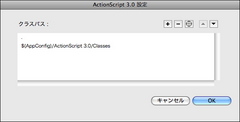 図:ファイルメニューの[環境設定...]のクラスパス設定。
相対パスを使えることから、Flashファイルが「myTest/sample/ball/test_ball.fla」にあり、クラス定義ファイルが「myTest/src/com/oshige/Ball.as」にあったとき、test_ball.flaのパブリッシュ設定で「../../src」をクラスパスに設定すればimport com.oshige.BallでBallクラスを使えるようになります。
このとき、Ballクラス定義ではpackage com.oshigeのようにパッケージを指定します。クラスパス設定でsrcフォルダ以下を指定することで、Ballクラスのパッケージ指定を変更せずにクラスファイルを使うことができます。
図:ファイルメニューの[環境設定...]のクラスパス設定。
相対パスを使えることから、Flashファイルが「myTest/sample/ball/test_ball.fla」にあり、クラス定義ファイルが「myTest/src/com/oshige/Ball.as」にあったとき、test_ball.flaのパブリッシュ設定で「../../src」をクラスパスに設定すればimport com.oshige.BallでBallクラスを使えるようになります。
このとき、Ballクラス定義ではpackage com.oshigeのようにパッケージを指定します。クラスパス設定でsrcフォルダ以下を指定することで、Ballクラスのパッケージ指定を変更せずにクラスファイルを使うことができます。
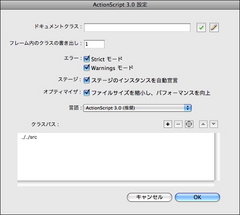 図:パブリッシュ設定で「../../src」をクラスパスに設定すれば、srcフォルダ以下がパッケージになります。]]>
p.168
tag:oshige.com,2008:/flash/as3note//16.3456
2008-09-16T02:57:30Z
2008-09-16T02:59:40Z
ムービーにドキュメントクラスを指定している場合には、フレームアクションでもコアク...
oshige
http://oshige.com
ムービーにドキュメントクラスを指定している場合には、フレームアクションでもコアクラス以外のクラスをimportしなければならないので、このことを補足しておきます。
追加原稿:
ただし、ドキュメントクラスを指定した場合には、フレームアクションでもコアクラス以外のクラスをimportしなければなりません。
p.167
tag:oshige.com,2008:/flash/as3note//16.3455
2008-09-16T02:53:15Z
2008-09-16T02:57:14Z
importするパッケージのベースパスとなるクラスパスの設定は各Flashムービ...
oshige
http://oshige.com
importするパッケージのベースパスとなるクラスパスの設定は各Flashムービーのパブリッシュ設定のFlashパネルのActionScriptのバージョン設定にもあるので、補足しておきます。
p.167 本文6行目
誤:ベースパスは環境設定の
正:ベースパスは環境設定およびパブリッシュ設定の
AS3.0中級2日間集中トレーニング
tag:oshige.com,2008:/flash/as3note//16.3428
2008-07-19T11:27:56Z
2008-07-19T11:38:42Z
「AS3.0入門2日間集中トレーニング」は無事終了しました。受講生の皆さん、あり...
oshige
http://oshige.com
図:パブリッシュ設定で「../../src」をクラスパスに設定すれば、srcフォルダ以下がパッケージになります。]]>
p.168
tag:oshige.com,2008:/flash/as3note//16.3456
2008-09-16T02:57:30Z
2008-09-16T02:59:40Z
ムービーにドキュメントクラスを指定している場合には、フレームアクションでもコアク...
oshige
http://oshige.com
ムービーにドキュメントクラスを指定している場合には、フレームアクションでもコアクラス以外のクラスをimportしなければならないので、このことを補足しておきます。
追加原稿:
ただし、ドキュメントクラスを指定した場合には、フレームアクションでもコアクラス以外のクラスをimportしなければなりません。
p.167
tag:oshige.com,2008:/flash/as3note//16.3455
2008-09-16T02:53:15Z
2008-09-16T02:57:14Z
importするパッケージのベースパスとなるクラスパスの設定は各Flashムービ...
oshige
http://oshige.com
importするパッケージのベースパスとなるクラスパスの設定は各Flashムービーのパブリッシュ設定のFlashパネルのActionScriptのバージョン設定にもあるので、補足しておきます。
p.167 本文6行目
誤:ベースパスは環境設定の
正:ベースパスは環境設定およびパブリッシュ設定の
AS3.0中級2日間集中トレーニング
tag:oshige.com,2008:/flash/as3note//16.3428
2008-07-19T11:27:56Z
2008-07-19T11:38:42Z
「AS3.0入門2日間集中トレーニング」は無事終了しました。受講生の皆さん、あり...
oshige
http://oshige.com
 ]]>
残席数わずか!AS3.0入門2日間トレーニング
tag:oshige.com,2008:/flash/as3note//16.3418
2008-07-08T03:32:23Z
2008-07-19T11:27:13Z
いよいよ来週。7月15日、16日の2日間。 サマーキャンプ2008 「Actio...
oshige
http://oshige.com
詳しくはこちら。
]]>
詳細!AS3.0入門ノート2予約受け付け開始!
tag:oshige.com,2008:/flash/as3note//16.3405
2008-06-28T07:07:11Z
2008-06-28T07:10:52Z
Amazonで予約受付を開始してます。よろしくー Adobe Flash CS3...
oshige
http://oshige.com
Adobe Flash CS3 ActionScript3.0入門ノート2 (CD付)
]]>
残席数わずか!AS3.0入門2日間トレーニング
tag:oshige.com,2008:/flash/as3note//16.3418
2008-07-08T03:32:23Z
2008-07-19T11:27:13Z
いよいよ来週。7月15日、16日の2日間。 サマーキャンプ2008 「Actio...
oshige
http://oshige.com
詳しくはこちら。
]]>
詳細!AS3.0入門ノート2予約受け付け開始!
tag:oshige.com,2008:/flash/as3note//16.3405
2008-06-28T07:07:11Z
2008-06-28T07:10:52Z
Amazonで予約受付を開始してます。よろしくー Adobe Flash CS3...
oshige
http://oshige.com
Adobe Flash CS3 ActionScript3.0入門ノート2 (CD付)
大重 美幸

ソーテック社 2008-07-19
売り上げランキング :
Amazonで詳しく見るby G-Tools]]>
AS3.0サマーキャンプ2008
tag:oshige.com,2008:/flash/as3note//16.3401
2008-06-20T03:35:22Z
2008-07-08T03:31:58Z
好評の去年に引き続き、今年もAS3.0サマーキャンプやります! ActionSc...
oshige
http://oshige.com
詳しくはこちら。
※AS3.0中級編は8月26日、27日の予定です。→詳しくはこちら。]]>