詳細!Progression 4 Flashフレームワーク入門ノート
大重美幸 著
2680円+税、287ページ
サンプル数115本(CS3/CS4/CS5用の各ファイルをダウンロードサービス)
発売日:2010年7月19日

この学習ノートの記事は試行錯誤が多く、情報も古くなってきましたね。
古い情報は閉じようと思います。
詳細!Progression 4 Flashフレームワーク入門ノート
大重美幸 著
2680円+税、287ページ
サンプル数115本(CS3/CS4/CS5用の各ファイルをダウンロードサービス)
発売日:2010年7月19日
この学習ノートの記事は試行錯誤が多く、情報も古くなってきましたね。
古い情報は閉じようと思います。
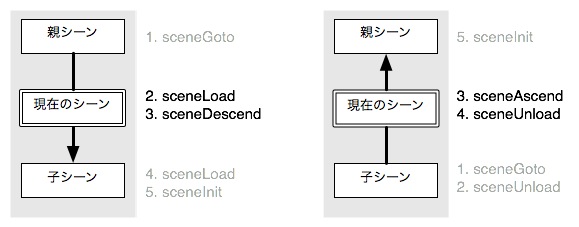
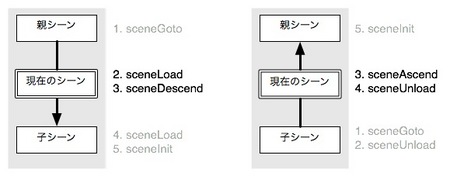
親シーンからの到着、親シーンへの移動で発生するイベント
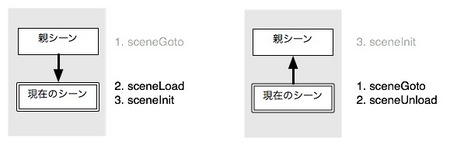
子シーンからの到着、子シーンへの移動で発生するイベント
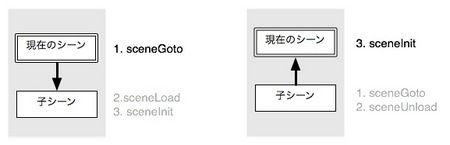
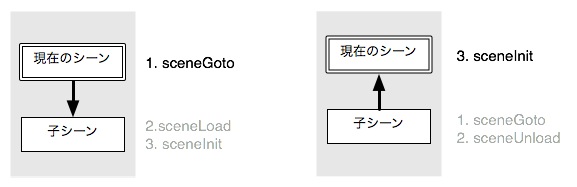
現在のシーンを通過する場合に発生するイベント
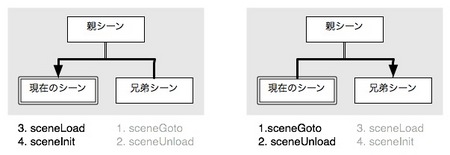
同じ親シーンをもつ子シーンの間で移動する場合に発生するイベント
親シーンではイベントが発生しない点に注意
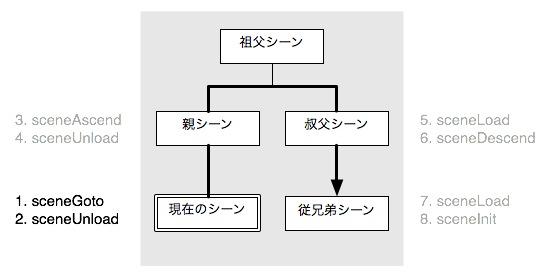
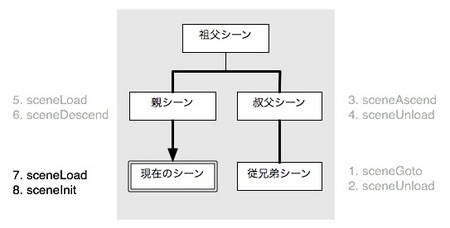
「従兄弟→叔父→親→現在」と移動する場合に発生するイベント
祖父シーンではイベントが発生しない点に注意
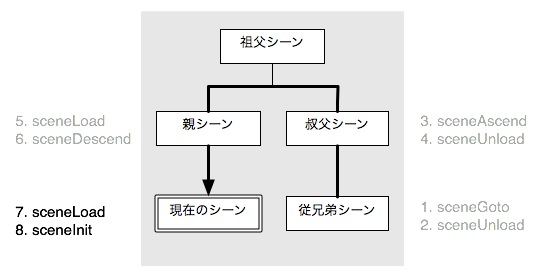
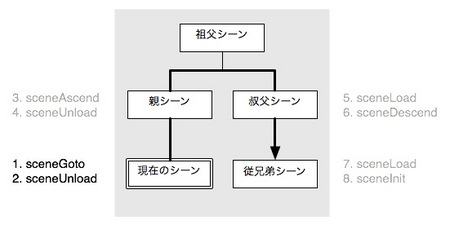
「現在→親→叔父→従兄弟」と移動する場合に発生するイベント
祖父シーンではイベントが発生しない点に注意
ご存じ面白法人カヤックのwonderflを利用してActionScript 3を始めようという新しい試みの本の執筆に参加しました。その名も「ブラウザで無料ではじめるActionScript 3.0 ―It's a wonderfl world―」。
ブラウザで無料ではじめるActionScript 3.0 ―It's a wonderfl world―
執筆陣も内容も豪華です!
面白法人カヤックFlashチーム(大塚雅和、小林太郎、道家陽介、中野総子、原真人、日高一明、村井孝至)、野中文雄、大重美幸、高輪知明nutsu、イズカワタカノブkatamari、村山健undefined、梅原宗士水玉製作所、小林陽介ローハイド、池田泰延clockmaker、吉川佳一BOW、小林茂yapan.org(敬称略)
Progression4とは直接は関係ない(こともない)けど、同梱されているパッケージには便利なクラスがあるので、手軽に使えるところをピックアップ。
jp.nium.collections
UniqueList ----- 重複するオブジェクトは追加されない配列。
jp.nium.utils
ArrayUtil ----- 配列比較、検索、複製、ストリング変換など。
ClassUtil ----- クラス名取得、クラスパス取得、パッケージ取得、属性チェック。
DateUtil ----- 月の日数を取得。日時の定数。
GraphicUtil ----- 基本図形を描画したSpriteを返すクラスメソッド。
MathUtil ----- 周期数値、偶数チェック、パーセント、レンジの関数。
MovieClipUtil ----- 関数を1フレーム遅れで実行、指定フレームが存在するか。
NumberUtil ----- 数値の桁数を0で揃える。1000桁ごとにカンマを付ける。
ObjectUtil ----- オブジェクトの複製、プロパティ一括設定。
StageUtil ----- ドキュメントクラスを調べる。左右上下のマージンを調べる。
StringUtil ----- 指定文字を改行コードに変換。文字を繰り返す。先頭を大文字。
URLUtil ----- 絶対パスに変換。拡張子を抽出。フォルダまでのパスを抽出。
Version ----- バージョン情報を扱うオブジェクト。バージョン比較。
XMLUtil ----- XMLListをObject表現(プロパティアクセス)に変換。
イベントは大事。こんなクラスがある。
とくに、ProcessEventとSceneEventはちゃんと見なきゃね。
jp.progression.events
CastEvent ----- AddChildやRemoveChildなどのイベント。
CastMouseEvent ----- CastButtonで発生するMouseEvent。
DataProvideEvent ----- ?
ExecuteErrorEvent ----- Commandオブジェクトのエラーイベント。
ExecuteEvent ----- Commandオブジェクトの実行、完了、中断などのイベント。
ManagerEvent ----- manager(progressionインスタンス?)の状態変化のイベント。
ProcessEvent ----- SceneManagerの実行、完了、中断などのイベント。
PROCESS_CHANGE, PROCESS_COMPLETE, PROCESS_EVENT,
PROCESS_SCENE, PROCESS_START, PROCESS_STOP
SceneEvent ----- シーンフローの移動、シーンのロード関連イベント。
SCENE_ADDED, SCENE_ADDED_TO_ROOT,
SCENE_REMOVED, SCENE_REMOVED_FROM_ROOT,
SCENE_ASCEND, SCENE_DESCEND,
SCENE_GOTO, SCENE_INIT, SCENE_INIT_COMPLETE,
SCENE_LOAD, SCENE_POST_UNLOAD, SCENE_PRE_LOAD, SCENE_UNLOAD
SCENE_QUERY_CHANGE, SCENE_TITLE_CHANGE
そうそう、PRMLLoaderもチェック。
jp.progression.loader
EasyCastingLoader ----- PRMLLoaderのサブクラス。
PRMLLoader ----- 読み込んだPRML形式のXMLを読み込みProgressionを生成する。
addCooand()の中でTweenerを利用する。
DoTweener(target:Object, parameters:Object, initObject:Object = null)
ex.
new DoTweener( this, { alpha:1, time:1 } )
new DoTweener( sp, { scaleX:1, time:1 } )
new DoTweener( this, { x:20, time:1, transition:"easeinoutback"} )
Tweener Documentation and Language Reference
http://hosted.zeh.com.br/tweener/docs/en-us/
これまた探すので一覧表示。自然と覚えますように。
*理解が進んだ時点で加筆修正してます。
jp.progression.commands
Break ----- 実行中の処理を中断する。
Command ------ 全てのコマンドのスーパークラス。
AddChild, Break, CommandList, DoExecutor, DoSound, DoTransition, DoTween, DoTweener, DoTweenFrame, Func, Goto, Jumpto, LoadCommand, NavigateToURL, Prop, RemoveAllChildren, RemoveChild, Return, SendToURL, Stop, Trace, WaitCommandInterruptType ----- Command.interrupt()の中断方法を示す定数定義 。
CommandList ----- コマンドリストのParallelList, SerialListのスーパークラス。
DoExecutor ----- 引数で指定したExecutorObjectを実行する。
Func ----- 引数で指定した関数を実行する。
Prop ----- 複数のプロパティを設定する。
Return ----- 実行中の処理を中断する。
Stop ----- LoopList、ShuttleListのループ処理を停止させる。
Trace ----- trace()を実行する。
Wait ----- 指定ミリ秒数だけ処理を停止させる。new Wait(3)を数値だけの3に省略可能。
jp.progression.commands.display
AddChild ----- 表示リストに表示オブジェクトを追加する。
AddChildAt ----- 指定の重なり(不連続可)に表示オブジェクトを追加する。
AddChildAtAbove ----- 指定位置の上の重なりに表示オブジェクトを追加する。
RemoveAllChildren ----- 表示リストからすべての子表示オブジェクトを取り去る。
RemoveChild ----- 表示リストから子表示オブジェクトを取り去る。
RemoveChildAt ----- 表示リストから指定位置の子表示オブジェクトを取り去る。
RemoveChildByName ----- 名前で指定した子表示オブジェクトを取り去る。
RemoveChildFromParent ----- Parentの子だから自分と同じ階層の兄妹表示オブジェクトを取り去るかな?
jp.progression.commands.lists
LoaderList ----- 複数のLoadコマンドをSerialListで実行する。
LoopList ----- SerialListのサブクラスで複数のコマンド実行を繰り返す(回数指定可。0回指定でStop()までループ)。
ParallelList ----- 複数のコマンドを並行して実行する。
SerialList ----- 複数のコマンドを順に終了を待って実行する。
ShuttleList ----- 複数のコマンドを順に実行し終了したら逆順で繰り返す。往復する。(片道を1回と数えて回数指定。0回指定でStop()までループ)。
TweenList ----- 複数のコマンドを開始タイミングをずらしながら並行して実行する。タイミングはfl.motion.easing.*で指定する。*ParallelListの中でコマンドリストを[]で囲むとその中はSerialListになる。
*SerialListの中でコマンドリストを[]で囲むとその中はParallelListになる。
*addCommand([[com1,com2],com3],com4)のように入れ子にすると[]の中でさらに反転。
jp.progression.commands.managers
Goto ----- 指定のシーンへ移動する。
Jumpto ----- 指定の孫シーンへ直接移動する。親シーン通過イベントが発生しない。
jp.progression.commands.media
DoSound ----- 指定したSoundオブジェクトを再生する。
jp.progression.commands.net
DownloadFileRef ----- ファイルをダウンロードする。
LoadBitmapData ----- 外部イメージファイルのビットマップデータを読み込む。
LoadCommand ----- このパッケージのLoad関連コマンドのスーパークラス。
LoadScene ----- SceneLoaderを使ってProgression使用のSWFを読み込む。
LoadSound ----- MP3を読み込む。
LoadSWF ----- Loaderを使ってSWFや画像を読み込む。
LoadURL ----- URLLoaderを使ってテキストデータを読み込む。
NavigateToURL ----- ブラウザでURLを開く。
SendToURL ----- データを送信する。
UploadFileRef ----- ファイルをアップロードする。
Cast〜っていう名前のクラスは、基本的にシーンに表示する表示オブジェクトのスーパークラスとして使うクラス。あるいはそれらのクラスで使用する定数を定義してあるクラス。その多くは標準の表示オブジェクトを拡張して作ってある。
jp.progression.casts
CastBitmap ----- Bitmapの拡張
CastButton ----- MovieClipの拡張
CastButtonState ----- CastButtonの状態を示す定数定義
CastButtonWindowTarget ----- CastButton.navitateTo()のtargetの定数定義
CastDocument ----- ドキュメントクラスのスーパークラスとして使う
CastImageLoader ----- イメージ読み込みに特化したLoaderの拡張
CastImageLoaderAlign ----- CastImageLoaderで使用する定数定義
CastImageLoaderRatio ----- CastImageLoaderで使用する定数定義
CastLoader ----- Loaderの拡張
CastMovieClip ----- MovieClipの拡張
CastPreloader ----- プリロード処理に特化した表示オブジェクト
CastSprite ----- Spriteの拡張
CastTextField ----- TextFieldの拡張
AdobeのFlashデベロッパーセンターの解説記事。これまだエントリーしてなかったよね。